Dependencies
This tutorial demonstrates how StepUp tracks dependencies.
Example
Example source files: docs/getting_started/dependencies/
The following plan.py defines two steps, with the second making use of the output from the first.
#!/usr/bin/env python3
from stepup.core.api import graph, run

run("echo Monday frown > ${out}; echo Coffee smile >> ${out}", shell=True, out="story.txt")
run("grep Coffee ${inp}", inp="story.txt")
graph("graph")
The placeholders ${inp} and ${out} are replaced by the inp and out keyword arguments.
This substitution happens early, before the steps are sent to the director process.
The graph() function writes the graph in a few formats,
which are used for visualization below.
Now run StepUp with up to 2 steps in parallel:
You will see the following output:
  DIRECTOR │ Listening on /tmp/stepup-########/director (StepUp Core 3.2.3.post54)
   STARTUP │ (Re)initialized boot script
     PHASE │ build
     START │ ./plan.py
   SUCCESS │ ./plan.py
     START │ echo Monday frown > story.txt; echo Coffee smile >> story.txt
   SUCCESS │ echo Monday frown > story.txt; echo Coffee smile >> story.txt
     START │ grep Coffee story.txt
   SUCCESS │ grep Coffee story.txt
─────────────────────────────── Standard output ────────────────────────────────
Coffee smile
────────────────────────────────────────────────────────────────────────────────
  DIRECTOR │ Trying to delete 0 outdated output(s)
  DIRECTOR │ See you!
Although StepUp allows 2 steps to run in parallel, it executes your run steps sequentially,
since it knows that the output of the first step will be used by the second.
Note, however, that the echo commands are already started before ./plan.py has finished.
This is the expected behavior: even without a complete overview of all the build steps,
StepUp will start the steps for which it has sufficient information.
Graphs
The plan.py script writes a few files to analyze and visualize the graphs StepUp uses internally.
The file graph.txt is a detailed human-readable version of .stepup/graph.db:
root:
             creates   file:plan.py
             creates   step:./plan.py

file:plan.py
               state = STATIC
              digest = 6616daa2 6f143752 291e1e69 8ede0bb0 65bd3f2d 6ab32fb0 7734f66e 8ff00037
          created by   root:
            supplies   step:./plan.py

step:./plan.py
               state = RUNNING
                need = PLAN
          created by   root:
            consumes   file:plan.py
             creates   step:echo Monday frown > story.txt; echo Coffee smile >> story.txt
             creates   step:grep Coffee story.txt

step:echo Monday frown > story.txt; echo Coffee smile >> story.txt
               state = PENDING
                need = DEFAULT
          created by   step:./plan.py
             creates   file:story.txt
            supplies   file:story.txt

file:story.txt
               state = AWAITED
          created by   step:echo Monday frown > story.txt; echo Coffee smile >> story.txt
            consumes   step:echo Monday frown > story.txt; echo Coffee smile >> story.txt
            supplies   step:grep Coffee story.txt

step:grep Coffee story.txt
               state = PENDING
                need = DEFAULT
          created by   step:./plan.py
            consumes   file:story.txt
This text format may not always be the most convenient way
to understand how StepUp connects all the steps and files.
A more intuitive picture can be created with GraphViz
using the .dot files as input.
The figures below were created using the following commands:
dot -v graph_provenance.dot -Tsvg -o graph_provenance.svg
dot -v graph_dependency.dot -Tsvg -o graph_dependency.svg
The workflow in StepUp consists of two graphs involving (a subset of) the same set of nodes: the dependency graph and the provenance graph.
Dependency Graph
This graph shows how information is passed from one node to the next as the steps are executed.
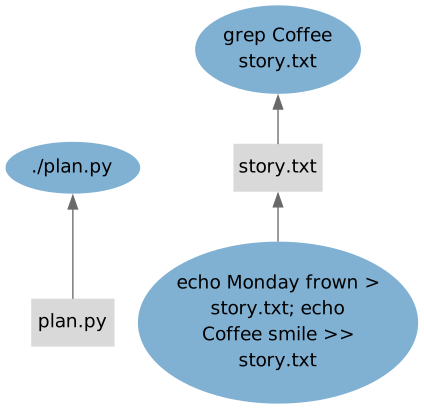
This is an intuitive graph showing the execution flow. A similar graph is used by most other build tools.
Provenance Graph
This one shows who created each node in the graph:
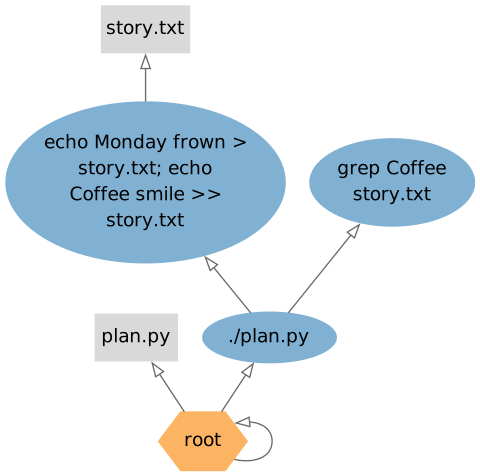
This diagram can be challenging to interpret and requires further explanation. Each node in StepUp’s workflow is created by exactly one other node, except for the Root node, which is its own creator. In this example, there are three nodes that create other nodes:
-
The
rootnode is an internal node controlled by StepUp. Upon startup, StepUp createsrootand a few other nodes by default:- The initial
plan.pyfile - The initial
./plan.pystep (with working directory./).
- The initial
-
The
./plan.pystep creates two nodes, see the tworun()function calls in theplan.pyscript above.- The
grep ...step. - The
echo ...step.
- The
-
The
echo ...step creates one output file:story.txt.
This provenance graph is used by StepUp to decide which steps to keep and which to clean up. After some files have changed and StepUp is run again, some nodes may no longer be created. These “old” nodes will still exist in the database as “detached” nodes, i.e. without a creator.
After all steps have been successfully completed, StepUp will remove detached nodes that are not suppliers to other steps. When output file nodes are deleted, the corresponding files are also removed from disk. StepUp ensures safe removal: it will only delete files if it confirms they were created in a previous run and if their file hash still matches the one recorded when they were originally built.
If some steps use detached nodes as input, those steps will remain pending, resulting in an incomplete build and blocking the removal of the detached nodes.
Example:
- After you modify
plan.pyand rerun StepUp, it will see that the file has changed and therefore detaches all nodes created by the oldplan.py. - When StepUp runs the new
plan.py, it may recreate some of the old nodes in exactly the same way, in which case the detached nodes will simply be restored, along with all of their products and related information. - If some nodes are not recreated, they will remain detached, and will be removed after a complete and successful build.
- The new
plan.pycan also define new nodes, which simply extend the graph. - Nodes that are recreated with different properties will override any existing detached nodes.
Exploration of the Graph in a Web Browser
You can explore the graph interactively in a web browser using the stepup browse command.
Run the following command in the same directory as above:
This will show the following output:
Open this link in a web browser to inspect every node in the graph. The web server will load the graph in memory and will only reload it when requested.
Try the Following
-
Run
sb -j 2again. As expected, the steps are now skipped. -
Modify the
grepcommand to select the first line (matchingMonday) and runsb -j 2again. Theechocommands are skipped as they have not changed. -
Change the order of the two steps in
plan.pyand runsb -j 2. The step./plan.pyis executed because the file has changed, but theechoandgrepsteps are skipped. This shows thatplan.pyis nothing but a plan, and it does not execute the steps itself. Whenplan.pyis executed, it simply sends instructions to the director process. -
Rename the file
story.txttolines.txt(in both steps) and restart StepUp. The oldstory.txtoutput file will be automatically removed from disk, as it is an intermediate output file whose node becomes detached and cleaned up.