Function Calls
StepUp Core implements a call protocol
for invoking named functions in scripts from a plan.py file.
Each call() registers exactly one step,
and a called function may itself call call() to register further steps,
enabling arbitrarily deep, dynamic planning.
Call Protocol
The following plan.py:
#!/usr/bin/env python3
from stepup.core.api import call, static

static("./cat.py", "data.txt")
call("./cat.py", "main", inp="data.txt", out="result.txt")
registers a step that runs:
The function name ("main") is the first command-line argument
and the serialized keyword arguments are the second.
StepUp treats the command string as part of the step’s digest,
so any change to the arguments automatically triggers a re-run.
The driver() Function
The call protocol does not require the called script,
e.g. ./cat.py in the previous example, to be a Python script.
However, in practice, that will often be the case.
To facilitate writing such Python scripts,
StepUp provides driver(),
which dispatches to the appropriate function based on the first command-line argument.
Add driver() to the if __name__ == "__main__": block of any Python script
called via call():
#!/usr/bin/env python3
from stepup.core.call import driver

def main(inp, out):
    if len(out) != 1:
        raise ValueError("Exactly one output file must be specified")
    with open(out[0], "w") as f:
        for path in inp:
            f.write(open(path).read())

if __name__ == "__main__":
    driver()
When the script is invoked with a function name as the first argument,
driver() dispatches to the matching function by name.
When invoked without any arguments, it prints one suggested command line
per callable function defined in the script, which may aid discovery:
The function only declares the parameters it actually uses.
inp and out are always forwarded as lists,
even if they were passed as a single string to call().
You can prefix private functions with an underscore (_),
e.g. _helper(), to hide them from driver().
Imported names are also excluded automatically.
To override the default selection of callable functions, list them explicitly in __all__.
Passing kwargs
Any JSON-serializable keyword argument passed to call() is forwarded to the function.
The function’s signature determines which parameters it receives.
Passing a keyword argument that the function does not declare raises a TypeError,
so typos in argument names are caught at execution time rather than silently ignored.
The only exceptions are inp and out, which are silently dropped when absent
from the function’s signature, since many functions do not need both.
# plan.py — pass a threshold to the run function
call("./work.py", "run", inp=["data.txt"], out=["result.txt"], threshold=0.5)
# work.py
from stepup.core.call import driver


def run(inp: list[str], out: list[str], threshold: float):
    ...


if __name__ == "__main__":
    driver()
Type annotations on the function parameters are respected:
driver() uses cattrs
to coerce and validate each argument before calling the function.
args_file Variant
When the JSON-serialized arguments are large,
they may become impractical to include inline on the command line.
You can also use an args_file to keep the commands short and readable:
This writes the arguments to run_args.json
(using dumpns())
and passes --inp=run_args.json to the script instead of an inline JSON string.
StepUp tracks run_args.json as an output of the calling step and an input of the called step,
so changes to the arguments are detected through the file’s hash.
Supported extensions are .json, .yaml, and .yml.
Two-Phase Example
Example source files: docs/getting_started/call/
The real power of call() is composing steps dynamically.
One common pattern is a two-phase script, where a plan() function registers a run() function.
The benefit of such a split is that the top-level ./plan.py
can focus on the high-level logic of the workflow,
while some details of the workflow are deferred to the plan() function of the called script.
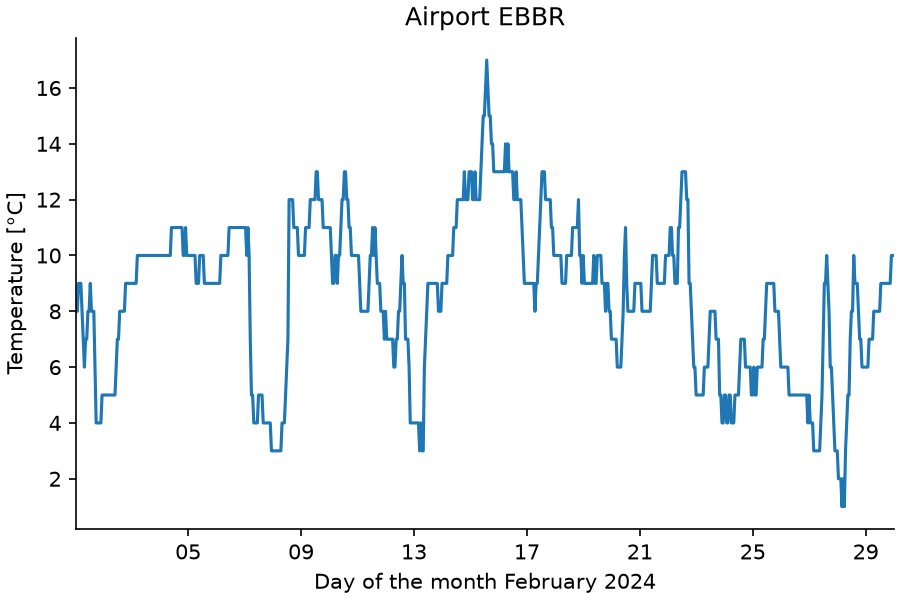
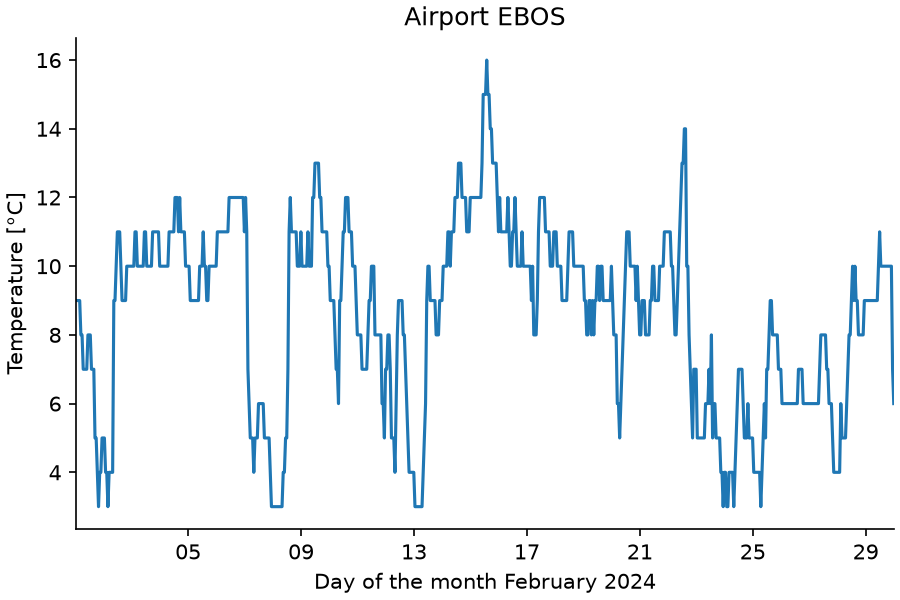
To make the example more engaging, it leverages NumPy and Matplotlib. The same plotting function is applied to two datasets of hourly temperatures recorded at the airports of Brussels and Ostend in February 2024, downloaded from the ASOS network hosted by Iowa State University.
Add the following plan.py:
#!/usr/bin/env python3
from stepup.core.api import call, static

static("plot.py", "ebbr.csv", "ebos.csv", "matplotlibrc")
for airport in "ebbr", "ebos":
    call("./plot.py", "plan", planning=True, airport=airport)
And plot.py with both a plan() and a run() function,
and a driver() entry point:
#!/usr/bin/env python3
import matplotlib as mpl
import matplotlib.pyplot as plt
import numpy as np
from matplotlib.dates import DateFormatter

from stepup.core.api import call
from stepup.core.call import driver


def plan(airport):
    call(
        "./plot.py",
        "run",
        inp=["matplotlibrc", f"{airport}.csv"],
        out=f"plot_{airport}.png",
        airport=airport,
    )


def run(inp, out, airport):
    mpl.rc_file(inp[0])
    dtype = [("dt", "datetime64[s]"), ("tmpc", "f8")]
    data = np.loadtxt(inp[1], dtype=dtype, delimiter=",", skiprows=1).T
    fig, ax = plt.subplots()
    ax.plot(data["dt"], data["tmpc"])
    ax.xaxis.set_major_formatter(DateFormatter("%d"))
    ax.set_xlabel("Day of the month February 2024")
    ax.set_xlim(data["dt"][0], data["dt"][-1])
    ax.set_ylabel("Temperature [°C]")
    ax.set_title(f"Airport {airport.upper()}")
    fig.savefig(out[0])


if __name__ == "__main__":
    driver()
It is assumed that the input files ebbr.csv, ebos.csv, and matplotlibrc
are present in the same directory as plan.py and plot.py.
Make the Python scripts executable and run StepUp:
You should see output like:
  DIRECTOR │ Listening on /tmp/stepup-########/director (StepUp Core 3.2.3.post54)
   STARTUP │ (Re)initialized boot script
     PHASE │ build
     START │ ./plan.py
   SUCCESS │ ./plan.py
     START │ ./plot.py plan '{"airport": "ebbr"}'
   SUCCESS │ ./plot.py plan '{"airport": "ebbr"}'
     START │ ./plot.py plan '{"airport": "ebos"}'
   SUCCESS │ ./plot.py plan '{"airport": "ebos"}'
     START │ ./plot.py run '{"airport": "ebbr", "inp": ["matplotlibrc", "ebbr.csv"], "out": ["plot_ebbr.png"]}'
   SUCCESS │ ./plot.py run '{"airport": "ebbr", "inp": ["matplotlibrc", "ebbr.csv"], "out": ["plot_ebbr.png"]}'
     START │ ./plot.py run '{"airport": "ebos", "inp": ["matplotlibrc", "ebos.csv"], "out": ["plot_ebos.png"]}'
   SUCCESS │ ./plot.py run '{"airport": "ebos", "inp": ["matplotlibrc", "ebos.csv"], "out": ["plot_ebos.png"]}'
  DIRECTOR │ Trying to delete 0 outdated output(s)
  DIRECTOR │ See you!
This produces the following figures:
Try the Following
-
Modify
matplotlibrcand re-run StepUp. Only theplot.py run ...steps re-execute becausematplotlibrcis an input to therun()function, not theplan()function. -
Add a third CSV file with weather data from an airport of your choice, and extend
plan.pyaccordingly.